clapgeek logo

An external system needs a file containing data for total hours of overtime worked for each worker. They would like to receive a file at the end of each month. The file should show compensation changes since the last integration run.
What is the recurrence type of the integration schedule?
Refer to the following scenario to answer the question below.
An external system needs a file containing data for recent worker job changes. They would like to receive a file routinely at 5:00 PM Eastern Standard Time, every 48 hours. The file should show job changes since the last integration run.
What is the recurrence type of the integration schedule?
How does an XSLT processor identify the specific nodes in an XML document to which a particular transformation rule should be applied?
After you transfer ownership of an Integration System to an ISU, what other component, if it exists, must you transfer ownership of to ensure the integration continues to run in an automated fashion?
Refer to the following XML to answer the question below.
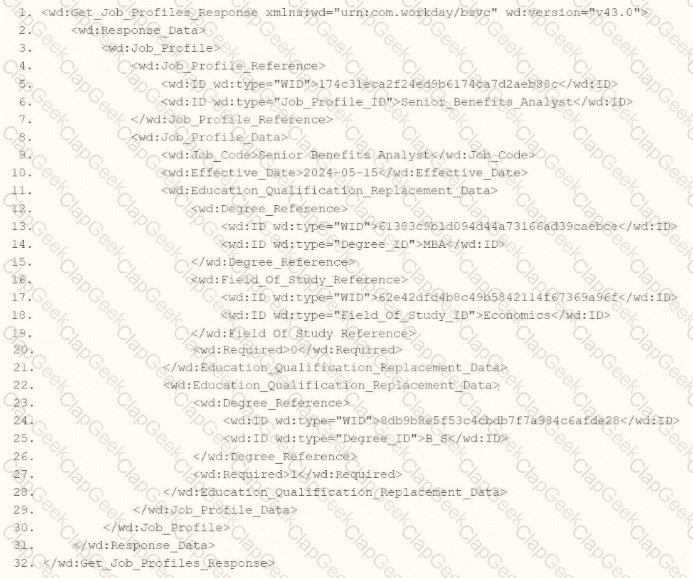
You are an integration developer and need to write XSLT to transform the output of an EIB which is making a request to the Get Job Profiles web service operation. The root template of your XSLT matches on the < wd:Get_Job_Profiles_Response > element. This root template then applies templates against < wd:Job_Profile > . What XPath syntax would be used to select the value of the ID element which has a wd:type attribute named Job_Profile_ID when the < xsl:value-of > element is placed within the template which matches on < wd:Job_Profile > ?
What is the task used to upload a new XSLT file for a pre-existing document transformation integration system?
Refer to the scenario. You are configuring a Core Connector: Worker integration to extract worker demographic and contact information. The integration uses the Data Initialization Service (DIS) and must include worker fields such as name, address, and a calculated field identifying workers eligible for a phone allowance.
During a Full File test run, the output file is missing all address-related information, even though the Address Line Data, Municipality, Region, and Postal Code fields were configured in the Configure Integration Field Attributes step. You also confirmed that the Worker Personal Data Section is marked as Include in Output.
What should you do to resolve this issue?
Refer to the following scenario to answer the question below.
You are configuring a Core Connector: Worker integration to send data to a new external compliance and certification tracking vendor. You have begun to configure the connector with the Data Initialization Service (DIS) enabled. Your goal is to extract worker qualification data, but the vendor has three specific requirements:
The file must only include Active workers who are in the “Clinical Staff” Job Family.
The vendor has specified that for each worker’s Education data, they only want to receive the Institution Name, Institution Type and Degree.
The vendor requires a custom “License ID” that must combine the Certification Name and Issuing State, for example, “RN-CA”. A Calculated Field that provides this custom “License ID” already exists in the tenant.
During testing, using a Full File run, the output file is missing all education-related information, even though you believe you have initially configured field attributes such as Institution Name, Institution Type and Degree in the Configure Integration Field Attributes step. Additionally, you confirmed that the Worker Qualification Data Section is marked as Include in Output.
What should you do to resolve this issue?
Refer to the following scenario to answer the question below.
A connector is configured to detect changes to government IDs, personal information, and compensation data. The worker history report below shows recent transactions for a new hire.
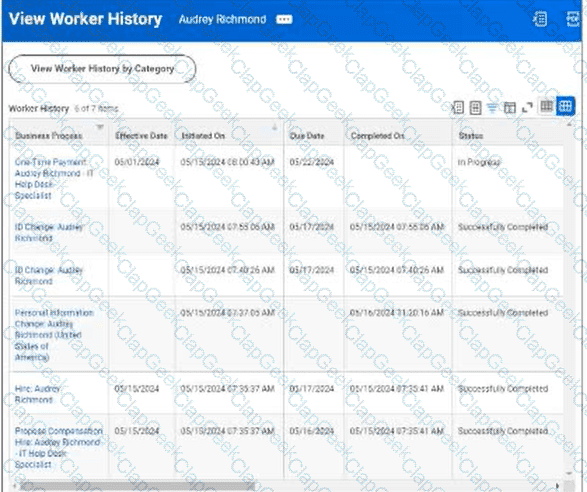
Worker History: Audrey Richmond
The worker history includes a One Time Payment transaction for Audrey Richmond with an effective date of 05/01/2024, initiated on 05/15/2024, due date of 05/17/2024, and status of In Progress. Other transactions shown include ID Change, Personal Information Change, Hire, and Propose Compensation records.
You launch the connector integration to process changes with the following parameters:
As Of Entry Moment: 05/17/2024 12:00:00 AM
Effective Date: 05/17/2024
Last Successful As Of Entry Moment: 05/15/2024 12:00:00 AM
Last Successful Effective Date: 05/15/2024
Why will the integration output file exclude the one-time payment change?
You are developing a Core Connector: Worker integration with DIS enabled. You configure the Population Eligibility to include all US workers and also define the Eligibility Criterion field to return only those workers assigned to the Sales organization.
When you run the integration, the output includes all US workers instead of just those in Sales.
What should you do to ensure only workers in the Sales organization appear in the output?
A vendor needs an EIB that uses a custom report to output data for payroll results. You have been asked to create a calculated field that will be used to output the highest deduction from a worker’s payroll results.
Which calculated field functions do you use to accomplish this?
You are configuring a monthly schedule for an EIB integration that runs on the last day of each month.
What is the maximum end date you can use in this configuration?
Refer to the following XML to answer the question below.
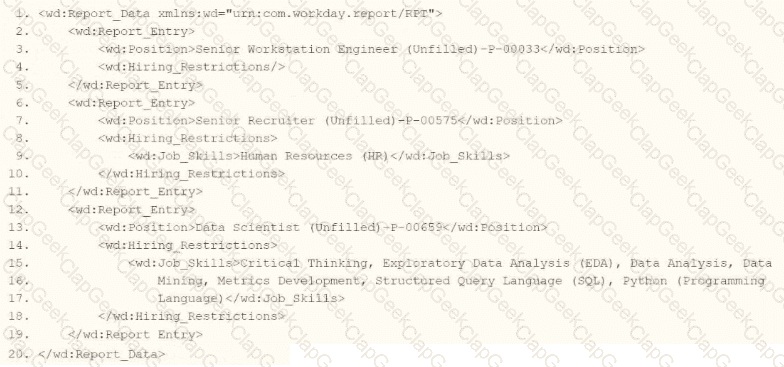
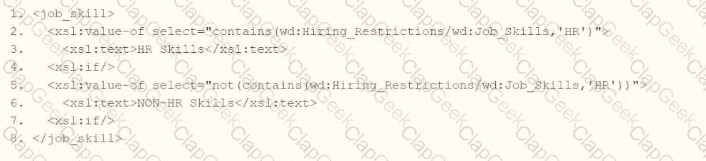
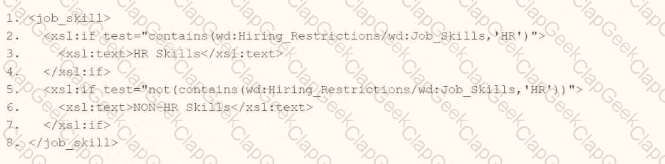
You are an integration developer and need to write X8LT to transform the output of an ElB which is using a web service enabled report to output position data along with hiring restrictions around skills. You currently have a template which matches on wd:Report Data/wd: Report .Entry for creating a record from each report entry.
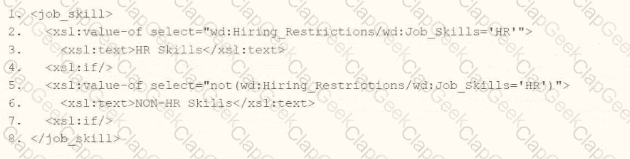
Within the template which matches on wd:Report_Entry you would like to conditionally process the wd:Job_Skills element by using a series of < xsl:if > elements so as to categorize the job skills data.
Assuming all jobs will have the wd:Job_Skills element, what XSLT syntax would be used to output the text HR Skills if the value of wd:Job_Skills contains the text HR and output NON-HR Skills if the value of wd:Job_Skills does not contain the text HR?

You have been asked to create a report that will be used by the EIB to output only workers with Child Dependents.
How do you configure the custom report to meet these requirements?
Refer to the following XML to answer the question below.
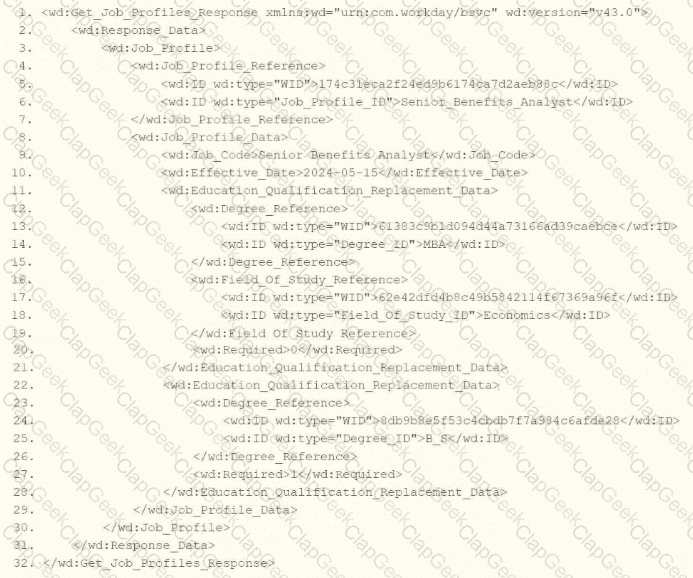
You are an integration developer and need to write XSLT to transform the output of an EIB which is making a request to the Get Job Profiles web service operation. The root template of your XSLT matches on the < wd:Get_Job_Profiles_Response > element. This root template then applies a template against < wd:Job_Profile > .
What XPath syntax would be used to select the value of the wd:Job_Code element when the < xsl:value-of > element is placed within the template which matches on < wd:Job_Profile > ?
Refer to the following scenario to answer the question below.
You have been asked to build an integration using the Core Connector: Worker template and should leverage the Data Initialization Service (DIS). The integration will be used to export a full file (no change detection) for employees only and will include personal data.
What configuration is required to ensure that when outputting phone number only the home phone number is included in the output?
When creating an XSLT file to transform the XML output of an EIB, you must have the XSL namespace. What other namespace(s) do you need to process any part of the source XML file?
Refer to the following scenario to answer the question below.
You have been asked to build an integration using the Core Connector: Worker template and should leverage the Data Initialization Service (DIS). The integration will be used to export a full file (no change detection) for employees only and will include personal data. The vendor receiving the file requires marital status values to be sent using a list of codes that they have provided instead of the text values that Workday uses internally and if a text value in Workday does not align with the vendors list of codes the integration should report " OTHER " .
What configuration is required to output the list of codes required from by the vendor instead of Workday ' s values in this integration?
What is the relationship between an ISU (Integration System User) and an ISSG (Integration System Security Group)?
Refer to the following scenario to answer the question below.
You are configuring a filename sequence generator for a connector. Below are common pattern tokens for timestamps ranging from the year to the millisecond.
Define the sequence format using a combination of string constants and pattern tokens to create a unique identifier. Note the example tokens include the square brackets.
For the next sequence number: [Seq] or [seq]
Assume date of September 21, 2022, 12:35:59:123 PM. Some common tokens:
Year: [yyyy] = 2022, [yy] = 22
Month: [MMM] = Sep, [MM] = 09, [M] = 9
Day: [d] = 21, [E] = Wed, [D] = 265
Hours: [k] = 13, [h] = 1
Minutes: [m] = 35
Seconds: [s] = 59
Milliseconds: [S] = 123
What configuration would generate a filename matching the day month year format for “File-14-1-2024.xml”?
Refer to the following XML to answer the question below.
Refer to the following XML to answer the question below.
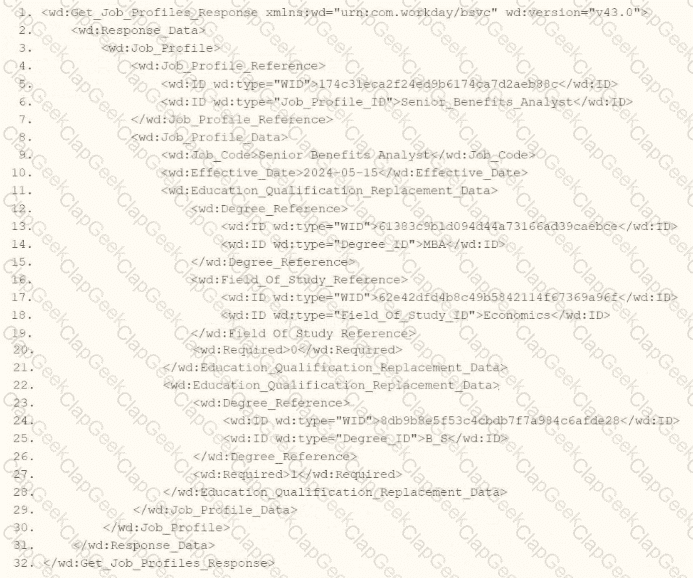
You are an integration developer and need to write XSLT to transform the output of an EIB which is making a request to the Get Job Profiles web service operation. The root template of your XSLT matches on the < wd:Get_Job_Profiles_Response > element. This root template then applies templates against < wd:Job_Profile > . XPath contains a number of delivered functions such as format-date. The format-date function uses the following syntax: format-date ($value as xs: date? $picture as xs:string). Within the template which matches on < wd:Job_Profile > , what XPath syntax would you use to output the value of the < wd:Effective_Date > element formatted with the day-month-year format of " 15-07-2024 " ?
An external system needs a file containing data for recent compensation changes. They would like to receive a file routinely at 5 PM eastern standard time, excluding weekends. The file should show compensation changes since the last integration run.
What is the recurrence type of the integration schedule?
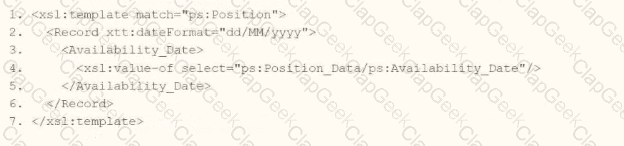
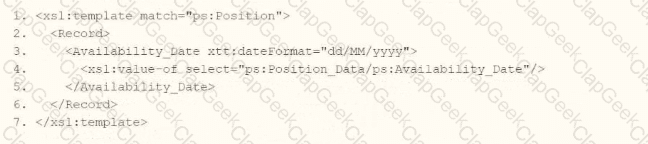
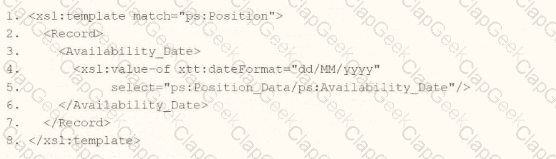
You need the integration file to generate the date format in the form of " 31/07/2025 " format
• The first segment is day of the month represented by two characters.
• The second segment is month of the year represented by two characters.
• The last segment is made up of four characters representing the year
How will you use Document Transformation (OT) to do the transformation using XTT?

You are configuring the Core Connector: Location to send location data to a new global facilities management system. You must meet three specific requirements:
Task A: The facilities system requires that in addition to the default public address, the private address should also be included.
Task B: The facilities system uses the status codes “A” for Active and “I” for Inactive. You need to translate Workday’s “Active” and “Inactive” values from the Location Status field.
Task C: The facilities system requires a “Building Manager” value. You have already built a Calculated Field that retrieves the Facilities Manager role for each location, and you need to send this data in the integration.
How do you configure these tasks in the integration system?
You are creating a connector based integration where all fields are provided by the template. However, the vendor would also like the following configurations as well:
• A file name output to have the current date and integration run number
• Have internal values for a particular field transferred to their external values
What workflow would you follow to create this integration?
Refer to the following scenario to answer the question below.
You have been asked to build an integration using the Core Connector: Worker template and should leverage the Data Initialization Service (DIS). The integration will be used to export a full file (no change detection) for employees only and will include personal data.
What configuration is required to ensure that only employees, and not contingent workers, are output by this integration?
When creating an ISU, what should you do to ensure the user only authenticates via web services?
What option for an outbound EIB uses a Workday-delivered transformation to output a format other than Workday XML?




TESTED 26 Sep 2026