Summer Certification Sale 70% Discount Offer - Ends in 0d 00h 00m 00s - Coupon code: clap70

MD-102 Endpoint Administrator Questions and Answers

Questions 4

You have a Microsoft 365 E5 subscription.

You need to create a dynamic device group that will contain any device that has the word Marketing in its name. Which device membership rule should you use?

Options:

A.

(device.displayName -in " ' Marketing ' " )

B.

(device.displayName -contains " ' Marketing ' " )

C.

(device.displayName -in " Marketing " )

D.

(device.displayName -contains " Marketing " )

Buy Now
Questions 5

You have a Microsoft 365 subscription that contains a user named User1. User! is assigned a Windows 10/11 Enterprise E3 license. You use Microsoft Intune Suite to manage devices. User1 activates the following devices:

• Device1: Windows 11 Enterprise

• Device2: Windows 10 Enterprise

• Device3: Windows 11 Enterprise

How many more devices can User1 activate?

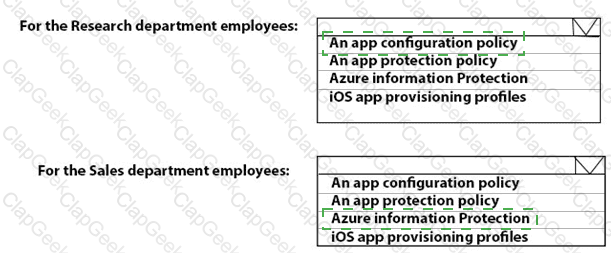
Options:

A.

2

B.

3

C.

7

D.

8

Buy Now
Questions 6

What should you use to meet the technical requirements for Azure DevOps?

Options:

A.

An app protection policy

B.

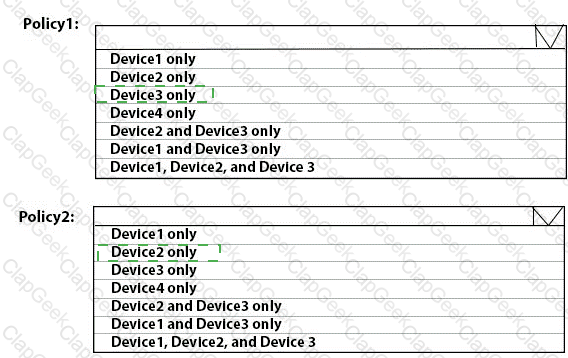
Windows Information Protection (WIP)

C.

Conditional access

D.

A device configuration profile

Buy Now
Questions 7

What should you upgrade before you can configure the environment to support co-management?

Options:

A.

the domain functional level

B.

Configuration Manager

C.

the domain controllers

D.

Windows Server Update Services (WSUS)

Buy Now
Questions 8

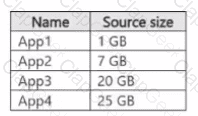
Which users can purchase and assign App1?

Options:

A.

User3 only

B.

User1 and User3 only

C.

User1, User2, User3, and User4

D.

User1, User3, and User4 only

E.

User3 and User4 only

Buy Now
Questions 9

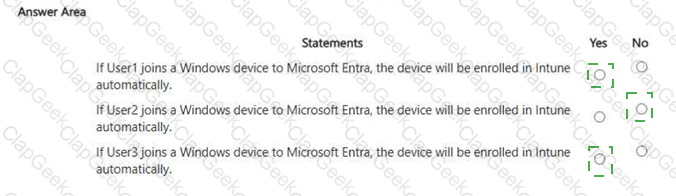
For each of the following statements, select Yes if the statement is true. Otherwise, select No. NOTE: Each correct selection is worth one point.

Options:

Buy Now
Questions 10

Which devices are registered by using the Windows Autopilot deployment service?

Options:

A.

Device1 only

B.

Device3 only

C.

Device1 and Device3 only

D.

Device1, Device2, and Device3

Buy Now
Questions 11

You need to ensure that computer objects can be created as part of the Windows Autopilot deployment. The solution must meet the technical requirements.

To what should you grant the right to create the computer objects?

Options:

A.

Server2

B.

Server1

C.

GroupA

D.

DC1

Buy Now
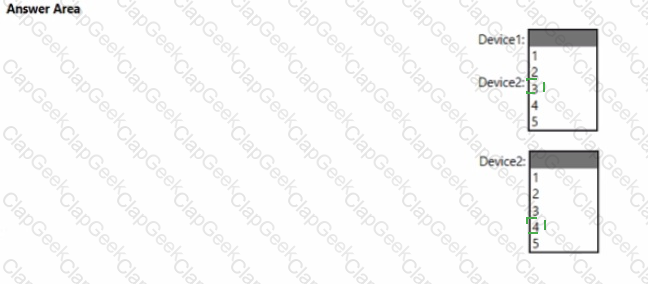
Questions 12

You implement the planned changes for Connection1 and Connection2

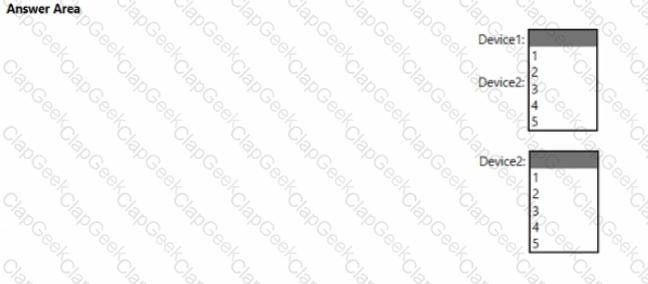
How many VPN connections will there be for User1 when the user signs in to Device 1 and Devke2? To answer select the appropriate options in the answer area.

NOTE; Each correct selection is worth one point.

Options:

Buy Now
Questions 13

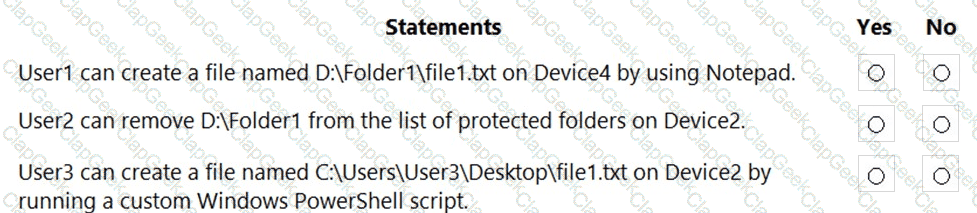
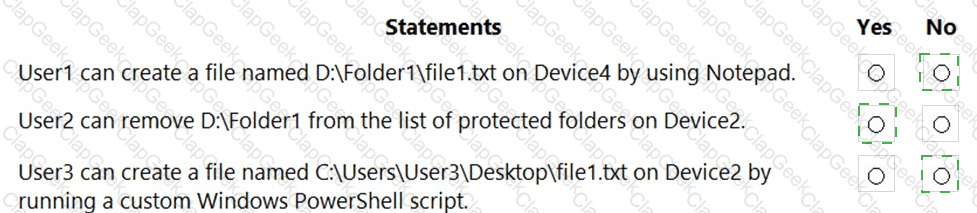
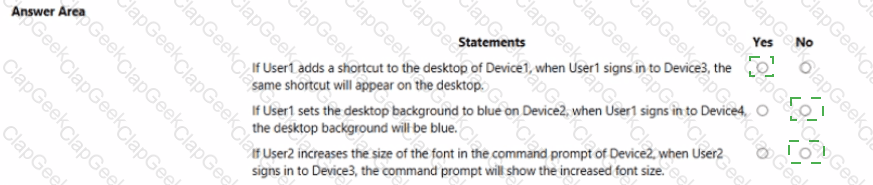
For each of the following statements, select Yes if the statement is true. Otherwise, select No.

NOTE: Each correct selection is worth one point.

Options:

Buy Now
Questions 14

Which user can enroll Device6 in Intune?

Options:

A.

User4 and User2 only

B.

User4 and User 1 only

C.

User1, User2, User3, and User4

D.

User4. User Land User2 only

Buy Now
Questions 15

You have a Microsoft 365 subscription that includes Microsoft Intune.

You have 500 corporate-owned Android devices enrolled as fully managed devices.

You need to prepare an app named App1 for deployment to the devices.

Which two actions should you perform? Each correct answer presents part of the solution.

NOTE: Each correct selection is worth one point,

Options:

A.

From the Intune Company Portal, download Appl.

B.

Create an OEMConfig profile.

C.

From the Managed Google Play Store, approve App1.

D.

Sync App1 with Intune.

Buy Now
Questions 16

You implement Boundary1 based on the planned changes.

Which devices have a network boundary of 192.168.1.0/24 applied?

Options:

A.

Device2 only

B.

Device3 only

C.

Device 1. Device2. and Device5 only

D.

Device 1, Device2, Device3, and Device4 only

Buy Now
Questions 17

You have 200 computers that run Windows 10. The computers are joined to Microsoft Azure Active Directory (Azure AD) and enrolled in Microsoft Intune.

You need to configure an Intune device configuration profile to meet the following requirements:

Prevent Microsoft Office applications from launching child processes.

Block users from transferring files over FTP.

Which two settings should you configure in Endpoint protection? To answer, select the appropriate settings in the answer area.

NOTE: Each correct selection is worth one point.

Options:

Buy Now
Questions 18

You need to meet the technical requirements for Windows AutoPilot.

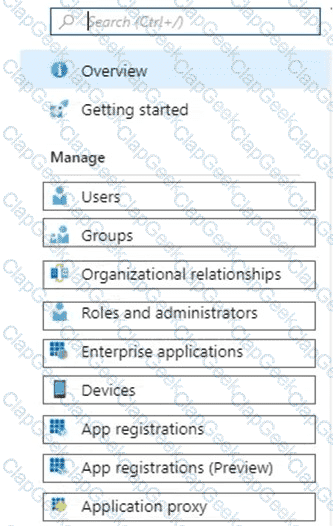
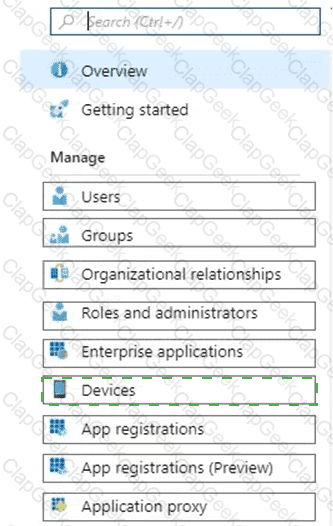
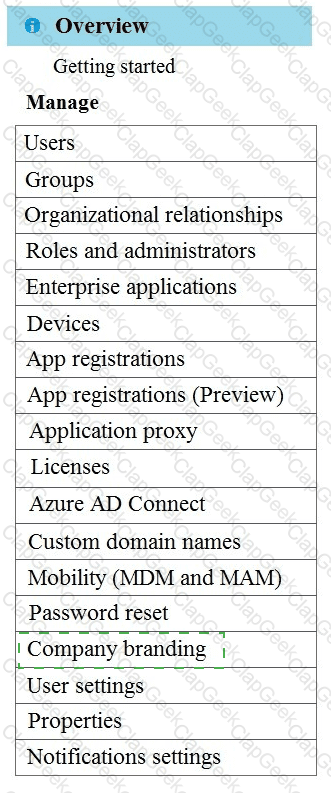
Which two settings should you configure from the Azure Active Directory blade? To answer, select the appropriate settings in the answer area.

NOTE: Each correct selection is worth one point.

Options:

Buy Now
Questions 19

You have a Microsoft 365 subscription that contains 500 Android Enterprise devices.

All the devices are enrolled in Microsoft Intune.

You need to deliver bookmarks to the Chrome browser on the devices

What should you create?

Options:

A.

a compliance policy

B.

a configuration profile

C.

an app protection policy

D.

an app configuration policy

Buy Now
Questions 20

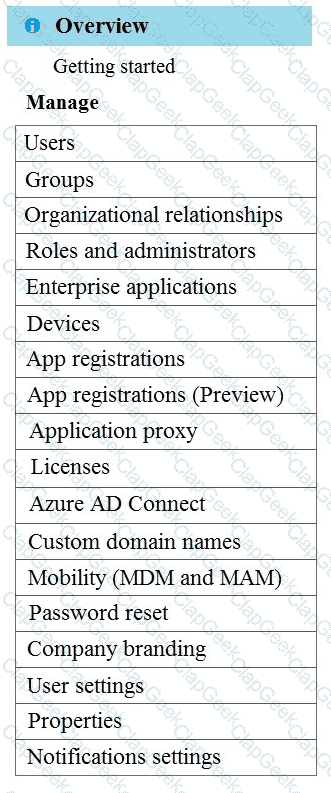
You need to meet the OOBE requirements for Windows AutoPilot.

Which two settings should you configure from the Azure Active Directory blade? To answer, select the appropriate settings in the answer area.

NOTE: Each correct selection is worth one point.

Options:

Buy Now
Questions 21

You need to recommend a solution to meet the device management requirements.

What should you include in the recommendation? To answer, select the appropriate options in the answer area.

NOTE: Each correct selection is worth one point.
Options:

Buy Now
Questions 22

You need to meet the device management requirements for the developers.

What should you implement?

Options:

A.

folder redirection

B.

Enterprise State Roaming

C.

home folders

D.

known folder redirection in Microsoft OneDrive

Buy Now
Questions 23

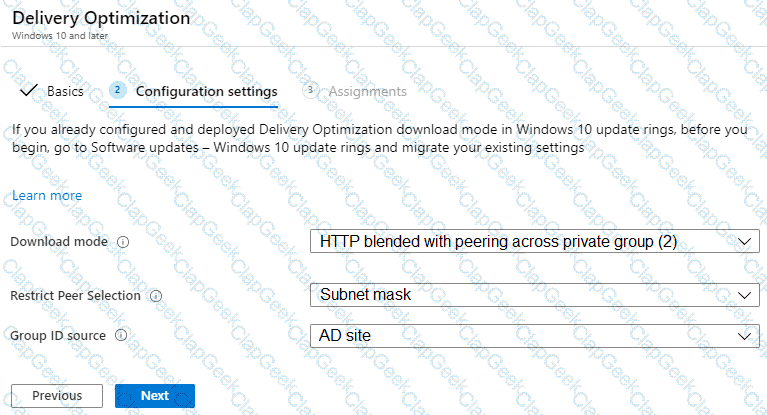
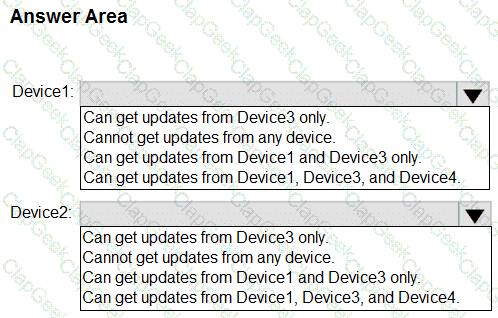
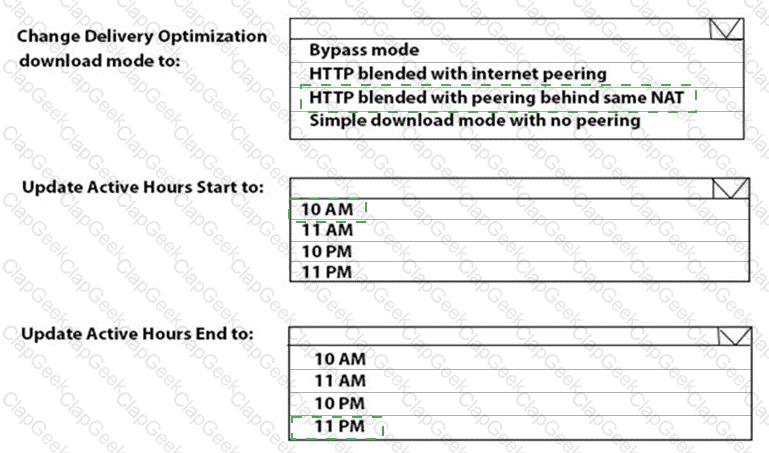
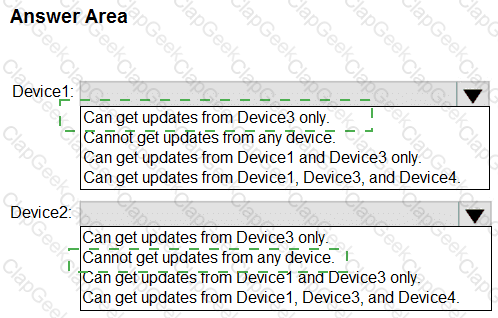
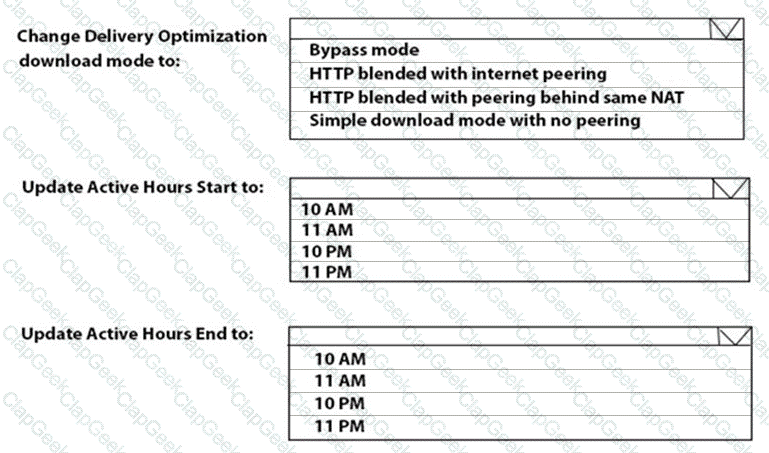
You need to resolve the performance issues in the Los Angeles office.

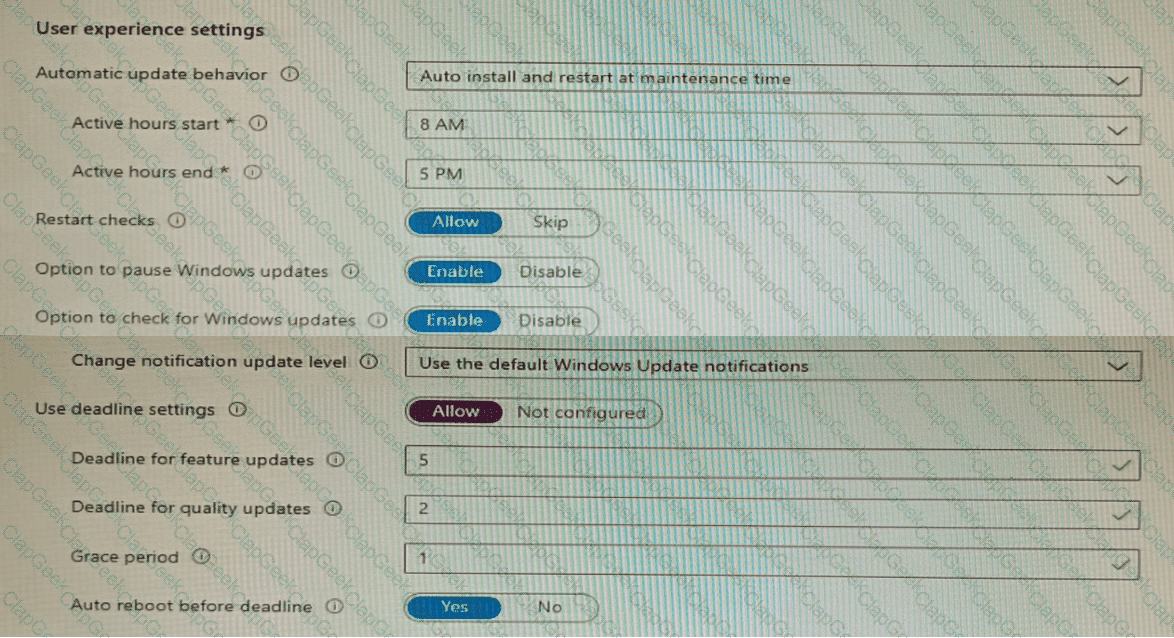
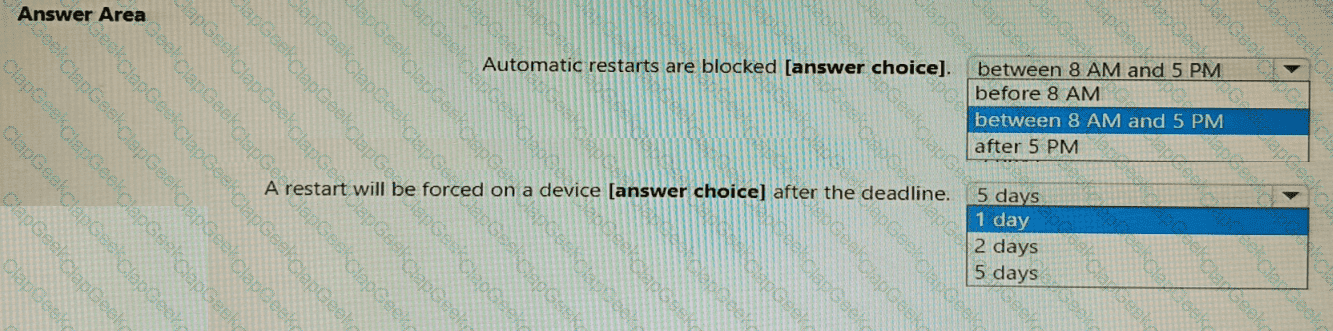
How should you configure the update settings? To answer, select the appropriate options in the answer area.

NOTE: Each correct selection is worth one point.

Options:

Buy Now
Questions 24

You need to meet the requirements for the MKG department users.

What should you do?

Options:

A.

Assign the MKG department users the Purchaser role in Microsoft Store for Business

B.

Download the APPX file for App1 from Microsoft Store for Business

C.

Add App1 to the private store

D.

Assign the MKG department users the Basic Purchaser role in Microsoft Store for Business

E.

Acquire App1 from Microsoft Store for Business

Buy Now
Questions 25

What should you configure to meet the technical requirements for the Azure AD-joined computers?

Options:

A.

Windows Hello for Business from the Microsoft Intune blade in the Azure portal.

B.

The Accounts options in an endpoint protection profile.

C.

The Password Policy settings in a Group Policy object (GPO).

D.

A password policy from the Microsoft Office 365 portal.

Buy Now
Questions 26

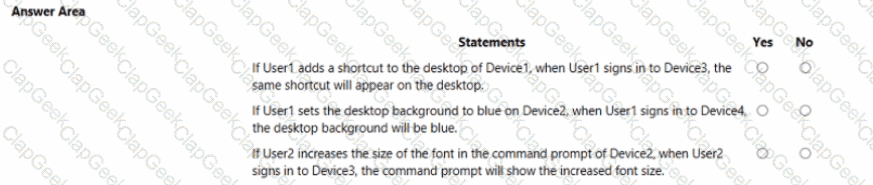
User1 and User2 plan to use Sync your settings.

On which devices can the users use Sync your settings? To answer, select the appropriate options in the answer area.

NOTE: Each correct selection is worth one point.

Options:

Buy Now
Questions 27

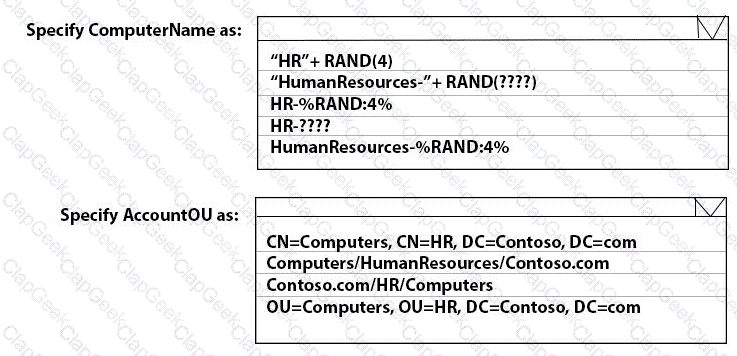
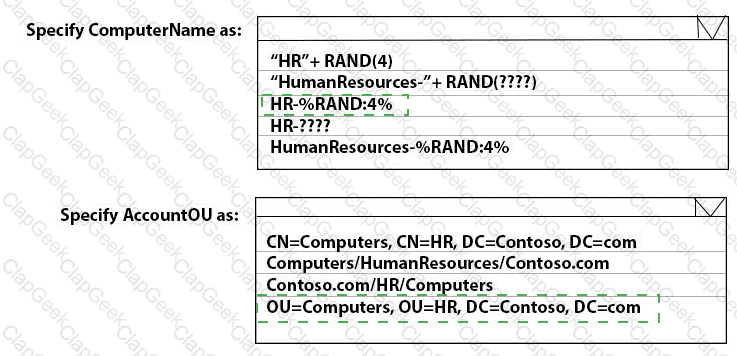
You need to meet the technical requirements for the new HR department computers.

How should you configure the provisioning package? To answer, select the appropriate options in the answer area.

NOTE: Each correct selection is worth one point.

Options:

Buy Now
Questions 28

You need to prepare for the deployment of the Phoenix office computers.

What should you do first?

Options:

A.

Extract the hardware ID information of each computer to a CSV file and upload the file from the Devices settings in Microsoft Store for Business.

B.

Generalize the computers and configure the Mobility (MDM and MAM) settings from the Azure ActiveDirectory blade in the Azure portal.

C.

Generalize the computers and configure the Device settings from the Azure Active Directory blade in the Azure portal.

D.

Extract the hardware ID information of each computer to an XLSX file and upload the file from the Devices settings in Microsoft Store for Business.

Buy Now
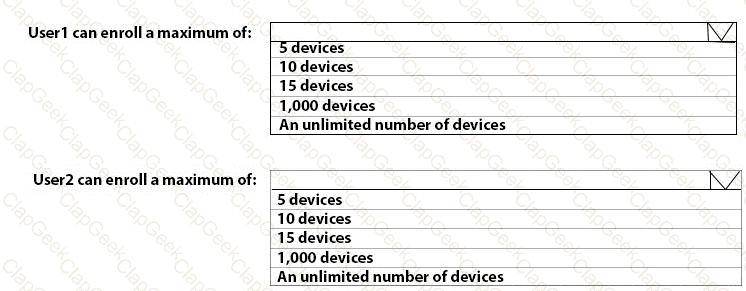
Questions 29

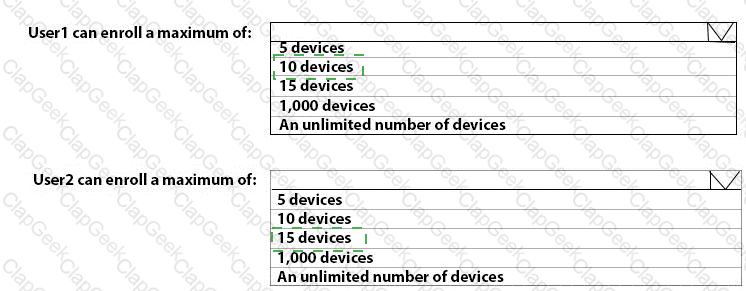
What is the maximum number of devices that User1 and User2 can enroll in Intune? To answer, select the appropriate options in the answer area.

NOTE: Each correct selection is worth one point.

Options:

Buy Now
Questions 30

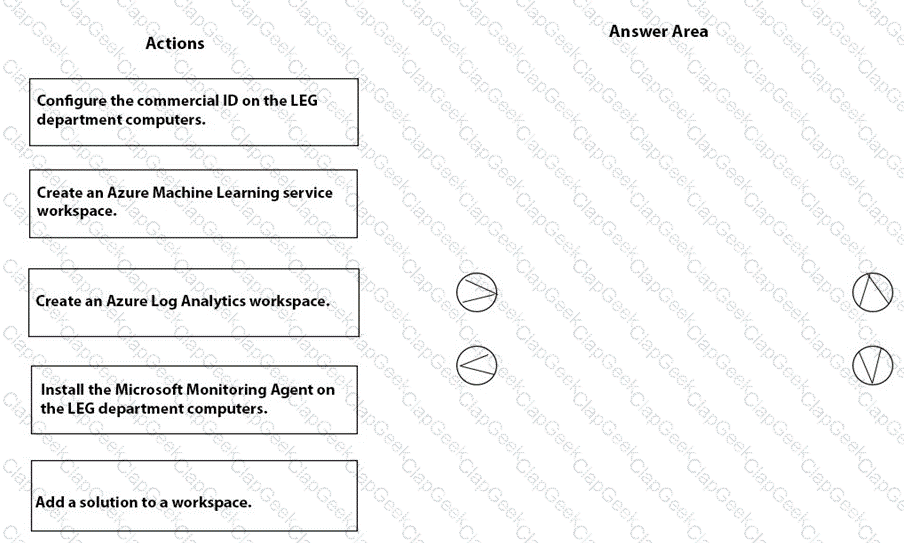
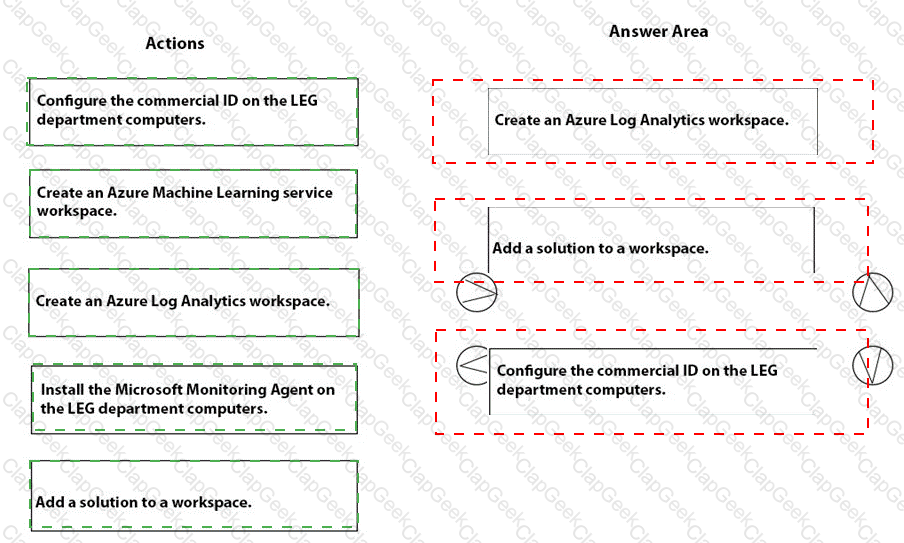
You need to meet the technical requirements for the LEG department computers.

Which three actions should you perform in sequence? To answer, move the appropriate actions from the list of actions to the answer area and arrange them in the correct order.

Options:

Buy Now
Questions 31

You have a Microsoft 365 ES subscription that includes Microsoft Intune.

The subscription contains Android Enterprise devices that are enrolled in Intune and have personally-owned work profiles. All the Android devices are members of a group named Group1.

You need to ensure that end users and Intune administrators receive an email message when an Android device does not have an up-to-date security provider

Which actions should you perform from the Microsoft Intune admin center in sequence? To answer, drag the appropriate actions to the correct order. Each action may be used once, more than once, or not at all. You may need to drag the split bar between panes or scroll to view content.

NOTE: Each correct selection is worth one point.

Options:

Buy Now
Questions 32

You need to capture the required information for the sales department computers to meet the technical

requirements.

Which Windows PowerShell command should you run first?

Options:

A.

Install-Module WindowsAutoPilotIntune

B.

Install-Script Get-WindowsAutoPilotInfo

C.

Import-AutoPilotCSV

D.

Get-WindowsAutoPilotInfo

Buy Now
Questions 33

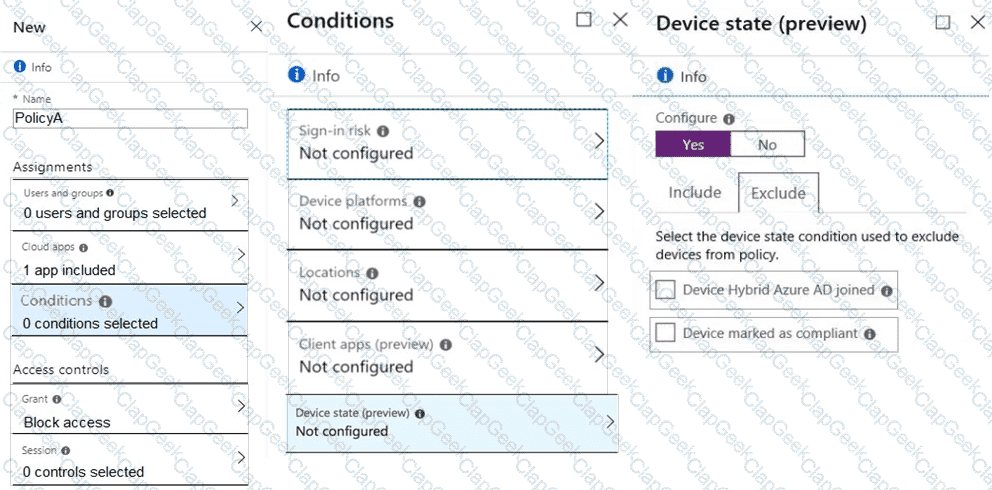
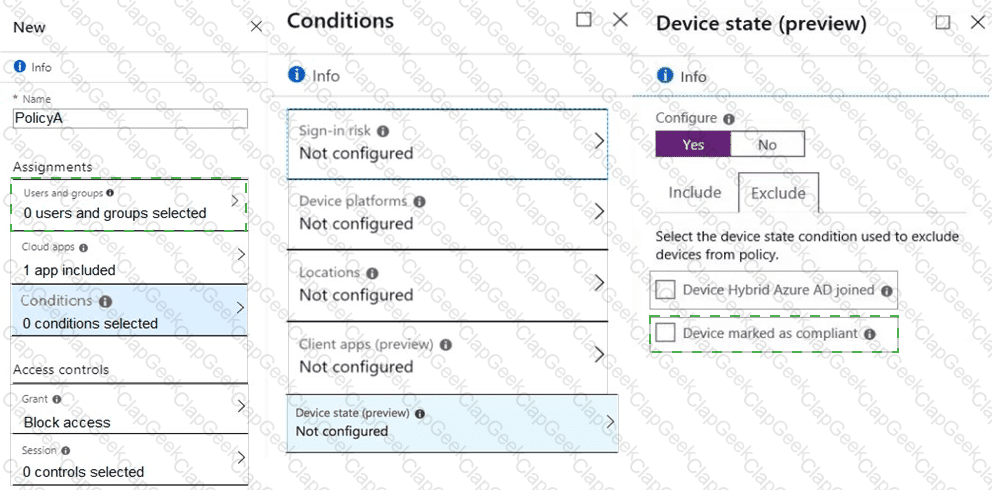
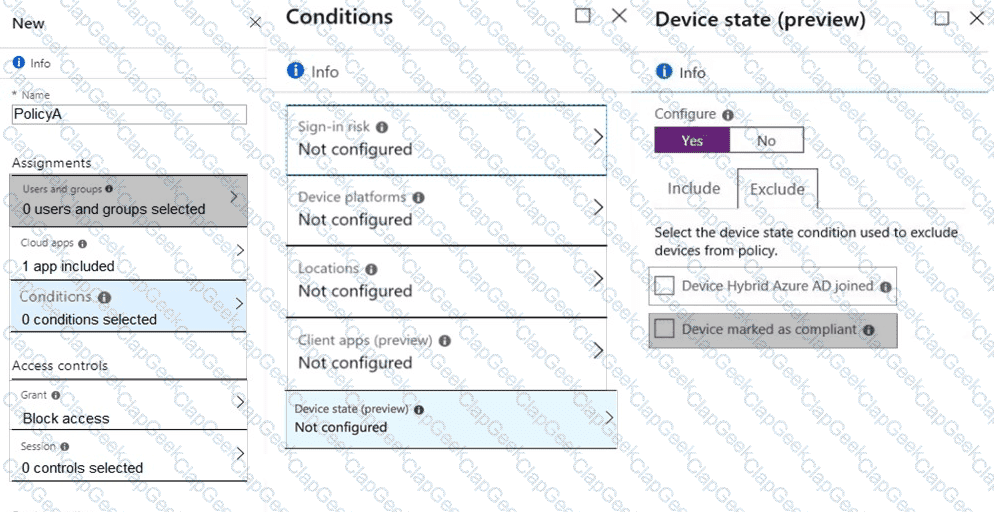
You need a new conditional access policy that has an assignment for Office 365 Exchange Online.

You need to configure the policy to meet the technical requirements for Group4.

Which two settings should you configure in the policy? To answer, select the appropriate settings in the answer area.

NOTE: Each correct selection is worth one point.

Options:

Buy Now
Questions 34

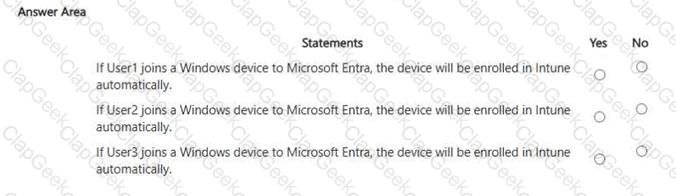
For each of the following statements, select Yes if the statement is true. Otherwise, select No.

NOTE: Each correct selection is worth one point.
Options:

Buy Now
Questions 35

You need to prepare for the deployment of the Phoenix office computers.

What should you do first?

Options:

A.

Generalize the computers and configure the Mobility (MDM and MAM) settings from the Azure Active Directory admin center.

B.

Extract the hardware ID information of each computer to a CSV file and upload the file from the Microsoft Intune blade in the Azure portal.

C.

Extract the hardware ID information of each computer to an XML file and upload the file from the Devices settings in Microsoft Store for Business.

D.

Extract the serial number information of each computer to a CSV file and upload the file from the Microsoft Intune blade in the Azure portal.

Buy Now
Questions 36

You need to meet the technical requirements for the iOS devices.

Which object should you create in Intune?

Options:

A.

A compliance policy

B.

An app protection policy

C.

A Deployment profile

D.

A device configuration profile

Buy Now
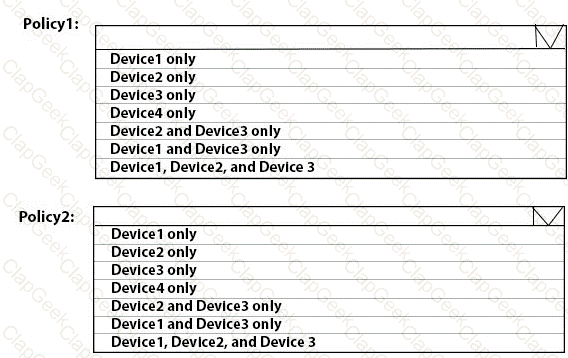
Questions 37

To which devices do Policy1 and Policy2 apply? To answer, select the appropriate options in the answer area.

NOTE: Each correct selection is worth one point.
Options:

Buy Now
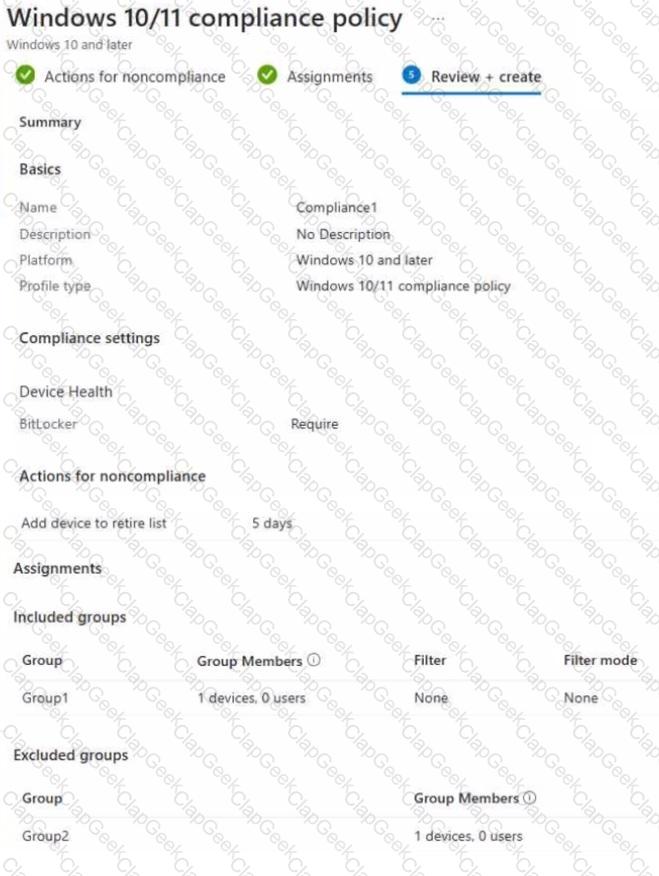
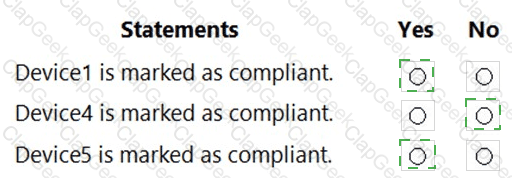
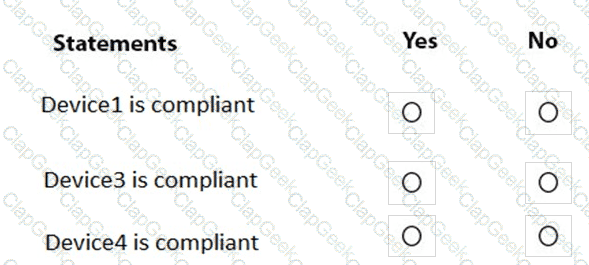
Questions 38

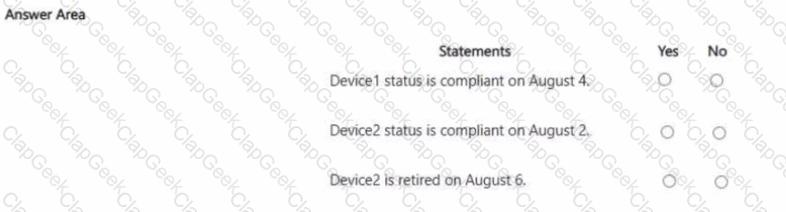
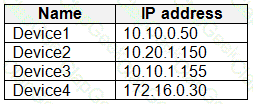
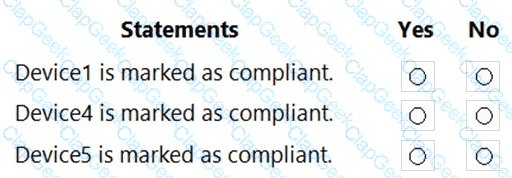
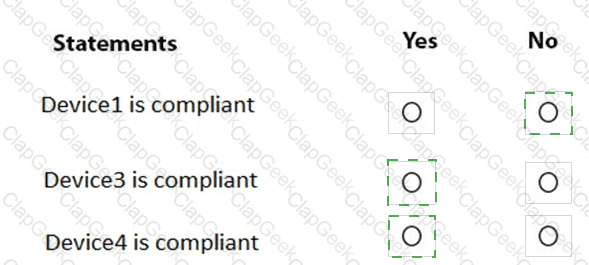
You are evaluating which devices are compliant.

For each of the following statements, select Yes if the statement is true. Otherwise, select No.

NOTE: Each correct selection is worth one point.

Options:

Buy Now
Questions 39

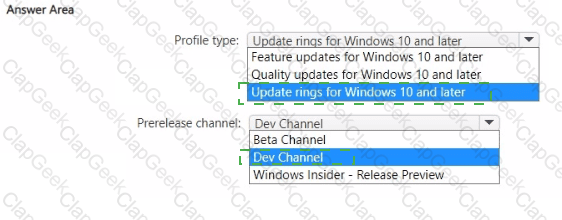
You have a Microsoft 365 subscription. All devices run Windows 10.

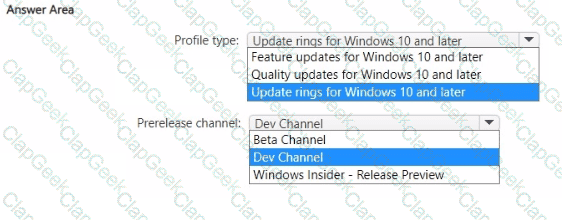
You need to prevent users from enrolling the devices in the Windows Insider Program.

What two configurations should you perform from the Microsoft Intune admin center? Each correct answer is a complete solution.

NOTE: Each correct selection is worth one point.

Options:

A.

a device restrictions device configuration profile

B.

an app configuration policy

C.

a Windows 10 and later security baseline

D.

a custom device configuration profile

E.

a Windows 10 and later update ring

Buy Now
Questions 40

You have a Microsoft 365 E5 subscription and use Microsoft Intune.

You purchase 50 Windows devices.

You configure automatic enrollment to Intune for Microsoft Entra joined devices.

You need to use a provisioning package to join the devices to Microsoft Entra.

What should you use to create the provisioning package, and what is the maximum amount of time you can use the package for bulk enrollment? To answer, select the appropriate options in the answer area.

NOTE: Each correct selection is worth one point.
Options:

Buy Now
Questions 41

You have a Microsoft 365 subscription.

You have 10 computers that run Windows 10 and are enrolled in mobile device management (MDM).

You need to deploy the Microsoft 36S Apps for enterprise suite to all the computers.

What should you do?

Options:

A.

From the Microsoft Intune admin center, create a Windows 10 device profile.

B.

From Azure AD, add an app registration.

C.

From Azure AD. add an enterprise application.

D.

From the Microsoft Intune admin center, add an app.

Buy Now
Questions 42

You have a Microsoft 365 subscription that uses Microsoft Intune.

You plan to use Windows Autopilot to provision 25 Windows 11 devices.

You need to meet the following requirements during device provisioning:

• Display the progress of app and profile deployments.

• Join the devices to Azure AD.

What should you configure to meet each requirement? To answer drag the appropriate settings to the correct requirements. Each setting may be used once, more than once, or not at all. You may need to drag the split bar between panes or scroll to view content.

NOTE: Each correct selection is worth one point.

Options:

Buy Now
Questions 43

Your company has an Azure AD tenant named contoso.com that contains several Windows 10 devices.

When you join new Windows 10 devices to contoso.com, users are prompted to set up a four-digit pin.

You need to ensure that the users are prompted to set up a six-digit pin when they join the Windows 10 devices to contoso.com.

Solution: From the Microsoft Entra admin center, you configure automatic mobile device management (MDM) enrollment. From the Microsoft Intune admin center, you create and assign a device restrictions profile.

Does this meet the goal?

Options:

A.

Yes

B.

No

Buy Now
Questions 44

You have a Microsoft 365 E5 subscription. The subscription contains devices that are Microsoft Entra joined and enrolled in Microsoft Intune

You create a user named User1.

You need to ensure that User1 can rotate BitLocker recovery keys by using Intune.

Solution: From the Microsoft Entra admin center, you assign the Helpdesk Administrator role to User1.

Does this meet the goal?

Options:

A.

Yes

B.

No

Buy Now
Questions 45

You have the Microsoft Deployment Toolkit (MDT) installed.

You install and customize Windows 11 on a reference computer

You need to capture an image of the reference computer and ensure that the image can be deployed to multiple computers.

Which command should you run before you capture the image?

Options:

A.

dism

B.

wpeinit

C.

sysprep

D.

bcdedit

Buy Now
Questions 46

You have a Microsoft 365 E5 subscription.

You need to manage operating system updates for corporate-owned Android Enterprise devices enrolled in Microsoft Intune. What should you use?

Options:

A.

an Android FOTA deployment

B.

a configuration profile

C.

an Endpoint security policy

D.

a compliance policy

Buy Now
Questions 47

You have a Microsoft 365 subscription that contains the following devices enrolled in Microsoft Intune:

• A corporate-owned Windows device named Device1

• A personally-owned Android device named Device2

You need to use a remote action on each device.

The solution must meet the following requirements:

• Repurpose Device1 by returning the device to the factory default settings.

• Remove only corporate data from Device2 and remove the device from Intune when the device checks in.

Which remote action should you use on each device? To answer, drag the appropriate remote actions to the correct devices. Each remote action may be used once, more than once, or not at all. You may need to drag the split bar between panes or scroll to view content.

NOTE: Each correct selection is worth one point.

Options:

Buy Now
Questions 48

You have an Azure AD tenant and 100 Windows 10 devices that are Azure AD joined and managed by using Microsoft Intune.

You need to configure Microsoft Defender Firewall and Microsoft Defender Antivirus on the devices. The solution must minimize administrative effort.

Which two actions should you perform? Each correct answer presents part of the solution.

NOTE: Each correct selection is worth one point.

Options:

A.

To configure Microsoft Defender Antivirus, create a Group Policy Object (GPO) and configure the Windows Defender Antivirus settings.

B.

To configure Microsoft Defender Firewall, create a device configuration profile and configure the Device restrictions settings.

C.

To configure Microsoft Defender Antivirus, create a device configuration profile and configure the Endpoint protection settings.

D.

To configure Microsoft Defender Antivirus, create a device configuration profile and configure the Device restrictions settings.

E.

To configure Microsoft Defender Firewall, create a device configuration profile and configure the Endpoint protection settings.

F.

To configure Microsoft Defender Firewall, create a Group Policy Object (GPO) and configure Windows Defender Firewall with Advanced Security.

Buy Now
Questions 49

You have an Azure AD tenant named contoso.com.

You have a workgroup computer named Computer! that runs Windows 11.

You need to add Computer1 to contoso.com.

What should you use?

Options:

A.

dsreecmd.exe

B.

Computer Management

C.

netdom.exe

D.

the Settings app

Buy Now
Questions 50

Your network contains an on-premises Active Directory Domain Services {AD DS) domain that syncs with an Azure AD tenant by using Azure AD Connect.

You use Microsoft Intune and Configuration Manager to manage devices.

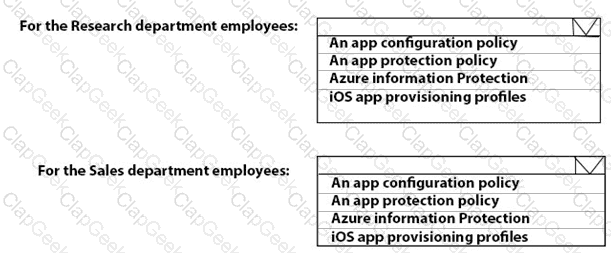
You need to recommend a deployment plan for new Windows 11 devices. The solution must meet the following requirements:

• Devices for the marketing department must be joined to the AD DS domain only. The IT department will install complex applications on the devices at build time, before giving the devices to the marketing department users.

• Devices for The sales department must be Azure AD joined. The devices will be shipped directly from the manufacturer to The homes of the sales department users.

• Administrative effort must be minimized.

Which deployment method should you recommend for each department? To answer, select the appropriate options in the answer area. NOTE: Each correct selection is worth one point.

Options:

Buy Now
Questions 51

You manage 1.000 devices by using Microsoft Intune. You review the Device compliance trends report. For how long will the report display trend data?

Options:

A.

30 days

B.

60 days

C.

90 days

D.

365 days

Buy Now
Questions 52

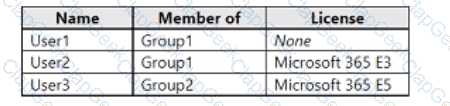
You have a Microsoft 365 subscription that uses Microsoft Intune and contains the users shown in the following table.

Group2 has been assigned in the Enrollment Status Page.

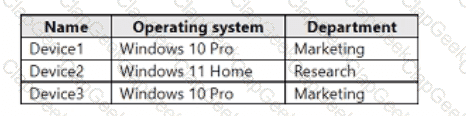
You have the devices shown in the following table.

You capture and upload the hardware IDs of the devices in the marketing department.

You configure Windows Autopilot.

For each of the following statements, select Yes if the statement is true. Otherwise select No.

NOTE: Each correct selection is worth one point.

Options:

Buy Now
Questions 53

You have an Azure AD tenant named contoso.com that contains the users shown in the following table.

You have a computer named Computer1 that runs Windows 10. Computer1 is in a workgroup and has the local users shown in the following table.

UserA joins Computer1 to Azure AD by using user1@contoso.com.

For each of the following statements, select Yes if the statement is true. Otherwise, select No.

NOTE: Each correct selection is worth one point.

Options:

Buy Now
Questions 54

You have a Microsoft 365 E5 subscription.

All devices are enrolled in Microsoft Intune.

You need to ensure that devices that have NOT checked in for 30 days are deleted from intune.

What should you configure from the Microsoft Intune admin center?

Options:

A.

a device limit restriction

B.

automatic enrollment

C.

a device clean-up rule

D.

a configuration profile

Buy Now
Questions 55

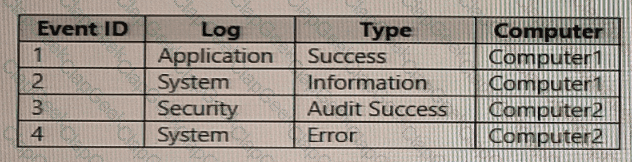
You have computer that run Windows 10 and connect to an Azure Log Analytics workspace. The workspace is configured to collect all available events from Windows event logs.

The computers have the logged events shown in the following table.

Which events are collected in the Log Analytics workspace?

Options:

A.

1 only

B.

2 and 3 only

C.

1 and 3 only

D.

1, 2, and 4 on

E.

1, 2, 3, and 4

Buy Now
Questions 56

You have a Microsoft 365 subscription that contains 1,000 iOS devices. The devices are enrolled in Microsoft Intune as follows:

• Two hundred devices are enrolled by using the Intune Company Portal.

• Eight hundred devices are enrolled by using Apple Automated Device Enrollment (ADE).

You create an iOS/iPadOS software updates policy named Policy 1 that is configured to install iOS/iPadOS 15.5.

How many iOS devices will Policy1 update, and what should you configure to ensure that only iOS/iPadOS 15.5 is installed? To answer, select the appropriate options in the answer area.

NOTE: Each correct selection is worth one point.
Options:

Buy Now
Questions 57

You have two computers named Computer1 and Computed that run Windows 10. Computed has Remote Desktop enabled.

From Computer1, you connect to Computer2 by using Remote Desktop Connection.

You need to ensure that you can access the local drives on Computer1 from within the Remote Desktop session.

What should you do?

Options:

A.

From Computer 2, configure the Remote Desktop settings.

B.

From Windows Defender Firewall on Computer 1, allow Remote Desktop.

C.

From Windows Defender Firewall on Computer 2, allow File and Printer Sharing.

D.

From Computer1, configure the Remote Desktop Connection settings.

Buy Now
Questions 58

You have a Microsoft 365 subscription. The subscription contains computers that run Windows 11 and are enrolled in Microsoft Intune. You need to create a compliance policy that meets the following requirements:

• Requires BitLocker Drive Encryption (BitLocker) on each device

• Requires a minimum operating system version

Which setting of the compliance policy should you configure for each requirement? To answer, drag the appropriate settings to the correct requirements. Each setting may be used once, more than once, or not at all. You may need to drag the split bar between panes or scroll to view content.
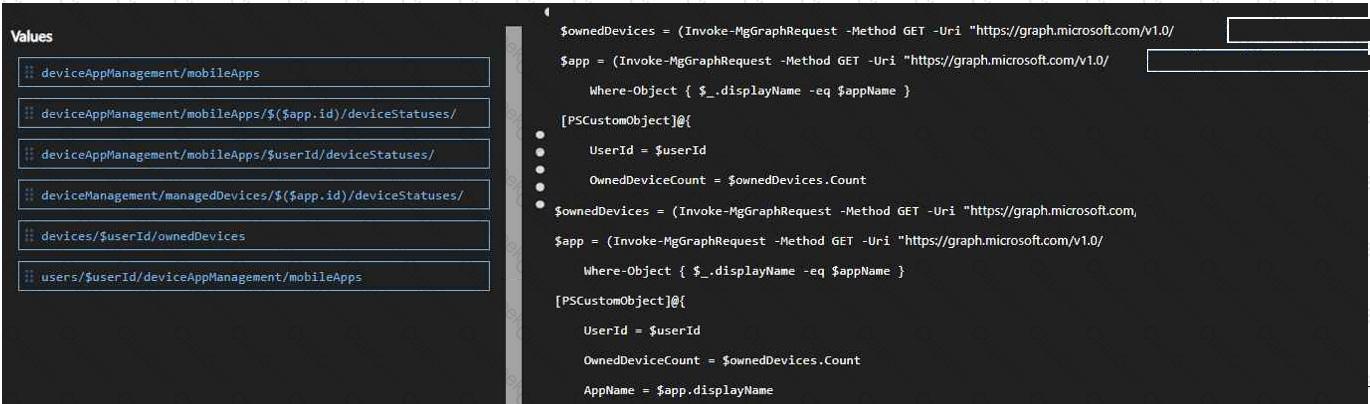
NOTE: Each correct selection is worth one point,

Options:

Buy Now
Questions 59

You need to meet the technical requirements for the IT department.

What should you do first?

Options:

A.

From the Azure Active Directory blade in the Azure portal, enable Seamless single sign-on.

B.

From the Configuration Manager console, add an Intune subscription.

C.

From the Azure Active Directory blade in the Azure portal, configure the Mobility (MDM and MAM) settings.

D.

From the Microsoft Intune blade in the Azure portal, configure the Windows enrollment settings.

Buy Now
Exam Code: MD-102
Exam Name: Endpoint Administrator
Last Update: Jun 29, 2026
Questions: 363
MD-102 pdf

MD-102 PDF

$28.5  $94.99
MD-102 Engine

MD-102 Testing Engine

$33  $109.99
MD-102 PDF + Engine

MD-102 PDF + Testing Engine

$43.5  $144.99